How availability works
Pay2Book can offer bookable times in two different ways. You can use one, the other, or both at the same time for the same service. Understanding the difference is the key to setting up your availability the way you want.
The two types of session
Section titled “The two types of session”Grid sessions are generated from the rules you set: your weekly hours, adjusted by date overrides, with booked time and busy calendar events subtracted. You say “I am free Mondays 9-12”, and Pay2Book offers slots within that window, automatically removing anything already taken which is defined in the Calendar section by the calendar and event settings (e.g block busy or block all events). You do not create each slot by hand - they come from your rules.
Event sessions are specific events that already exist on your calendar. If you turn on Free events are bookable for a calendar, any free event there becomes a bookable session, exactly as you placed it. You create the event in your own calendar - a one-off, or a repeating one - and it appears as a session people can book.
Both kinds flow into the same place - your public booking page - and a booker’s pick lands on your calendar:
Side by side
Section titled “Side by side”| Grid sessions | Event sessions | |
|---|---|---|
| Where slots come from | Your weekly hours and date overrides | Events you put on your calendar |
| How you set them up | Set rules once, slots are generated | Create each event (one-off or repeating) |
| Best for | Regular, open availability | Specific sessions placed by hand |
On your booking page they sit together. An Event session appears as its own named block; Grid sessions appear as plain time slots under Available times.
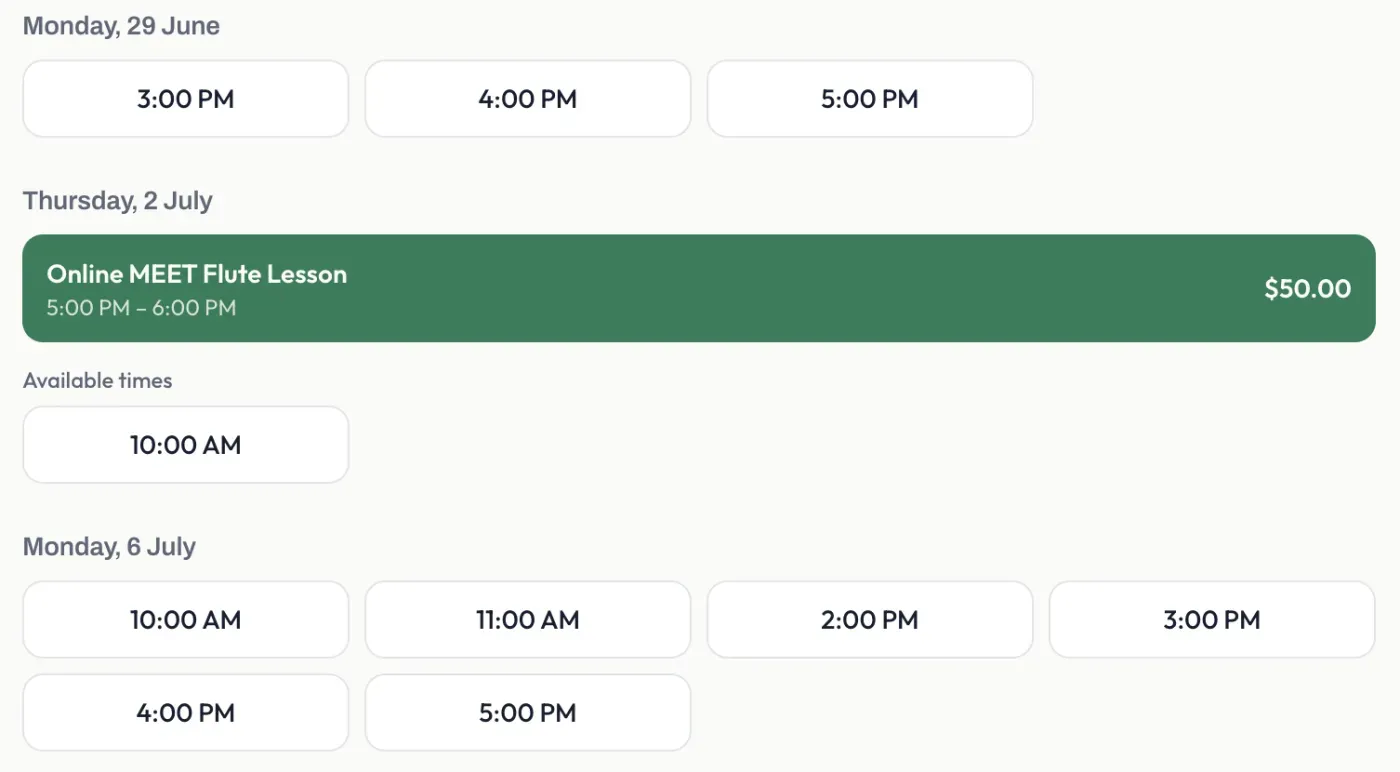
In the example above, the green Online MEET Flute Lesson block is an Event session - a real event on the owner’s calendar - while the Available times below it are Grid sessions generated from weekly hours.
Use one, the other, or both
Section titled “Use one, the other, or both”- Grid Sessions only - set your weekly hours and let Pay2Book generate slots. Simplest for regular, open booking.
- Event Sessions only - turn off availability rules and just mark the specific calendar events you want bookable. Best when every session is something you place deliberately.
- Both - keep open grid and surface particular calendar events as event sessions. A booker sees both on the same page.