Creating and managing services
A service is something people can book from you - a coaching call, a music lesson, a consultation. Each service has a length, a price (or is free), how many people can book one session, and when it is available.
You manage all of this on the Services page.
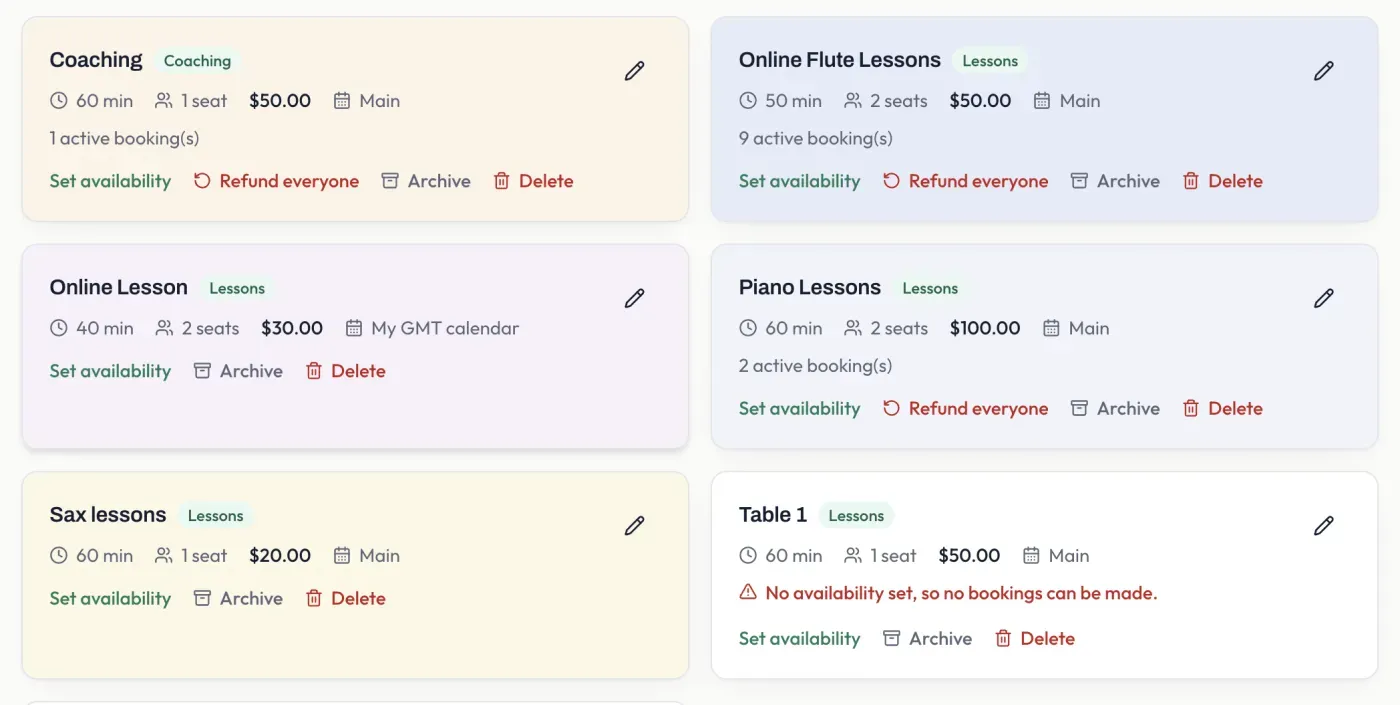
What a service includes
Section titled “What a service includes”Each service card shows:
- Length - how long a session lasts.
- Seats - how many people can book the same session. One seat is a private session; more than one makes it a group session.
- Price - what a booker pays per seat, or Free for a service that takes no payment (see Free or paid).
- Calendar - which of your calendars the booking is written to.
- Active bookings - how many bookings the service currently has.
Setting availability
Section titled “Setting availability”A new service has no availability until you set it, and a service with no availability cannot be booked - you will see a warning on its card until you do. Select Set availability to choose when the service can be booked. You can offer generated time slots, specific calendar events, or both - see how availability works.
Managing a service
Section titled “Managing a service”From each service card you can:
- Set availability - choose when it can be booked.
- Refund everyone - refund all current bookings for the service (shown only when it has bookings).
- Unpublish - take the service off your booking page without deleting it. Existing bookings are unaffected, and you can publish it again at any time.
- Delete - remove the service from your list. Available once it is unpublished.
Use the pencil icon on a card to edit the service’s details, such as its name, price, or length.